USB and wireless connection
Connect over USB debugging for a dependable wired session, or pair through Android Wireless debugging when you want the phone free from cables.
ANDROID MIRRORING FOR WINDOWS
Put your Android phone on your desktop with responsive video, audio passthrough, mouse and keyboard control, and a connection flow that stays out of your way.
One-time license · Windows 10 and 11 · Up to 3 devices
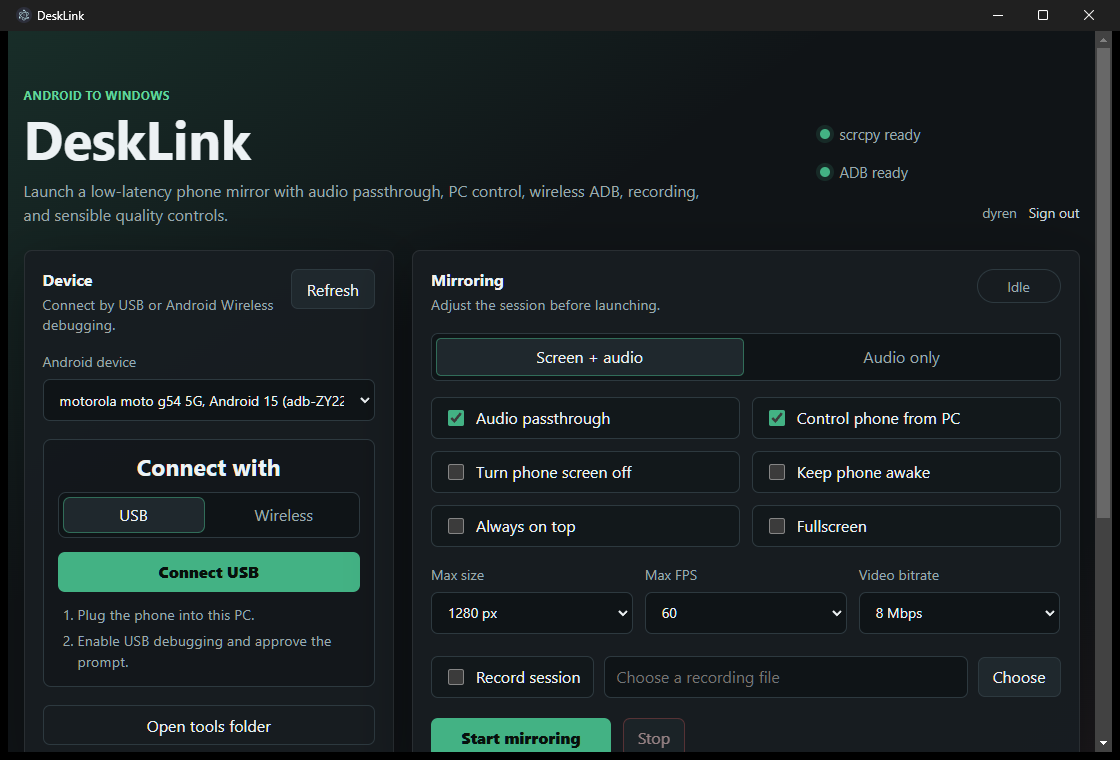
A PRACTICAL DESKTOP COMPANION
DeskLink wraps the proven scrcpy mirroring engine in a clean Windows interface. Connect a phone, choose the quality you need, and launch a low-latency mirror with the controls you use most already within reach.
WHAT IT DOES
Connect over USB debugging for a dependable wired session, or pair through Android Wireless debugging when you want the phone free from cables.
Use your mouse and keyboard through scrcpy to open apps, type messages, navigate menus, and operate the mirrored phone directly from Windows.
Forward supported Android audio alongside the mirrored display, or use audio-only mode when you do not need video or phone controls.
Adjust resolution, frame rate, and video bitrate to favor clarity, responsiveness, or lower network usage for wireless sessions.
Record a mirror session directly to a file for demonstrations, troubleshooting, tutorials, or personal archives.
Keep the phone awake, switch its screen off while mirroring, pin the mirror above other windows, or launch directly into fullscreen.
HOW IT WORKS
SIMPLE PRICING
Use DeskLink on up to three of your own Windows devices. Your account keeps the license and activated devices together.
One-time purchase